শুক্রবার, এপ্রিল ২৯, ২০১১

BLADE

BLADE - WINDOWS 7 THEME

[IF U WANNA USE THIS THEME AT 1ST U HAV TO PATCH UR WINDOWS 7 THEMES, PLS CHEK OUR PAGE INFO TO KNOW HOW TO PATCH http://extremewin.blogspot.com/2011/04/universal-theme-patcher-instructions.html
]

============================================
donwload link :http://www.mediafire.com/?tjoq6asrm1j40
[WEN U GO TO THIS LINK U WILL SEE MANY FILES JUST DOWNLOAD THESE FILES AND FOLLOW MY INSTRUCTION , GIVEN BELOW: ]

MAIN THEME FILE:
BladeThemePackx64-v10.exe << for win7 64-bit
BladeThemePackx86-v10.exe <<for win7 32-bit
(just download and install theme file and see magic ;) )

DESKTOP GADGETS:
Blade Computer Status.gadget
Blade Digital Clock.gadget
NetworkMeterv2.4.gadget.gadget
(download ,install and select gadget from menu)

ICON PACK:
7tsp_Blade_Icons_Theme_Extras.7z
(this icon pack hav to install by 7tsp , 7tsp instruction file: http://www.mediafire.com/?dx5x9nva5ys6aja)

[INSTALL BLACK GLASS ENHANCED FOR TRANSPARENT WINDOW ,
download link : http://www.mediafire.com/?yth0unf6c7qecko ]

TRON LEGACY

WINDOWS 7 - TRON LEGACY THEME

[IF U WANNA USE THIS THEME ON UR WINDOWS 7 U HAV TO PATCH UR WINDOWS 7 THEMES , SEE OUR PAGE INFO TO KNOW HOW TO PATCH http://extremewin.blogspot.com/2011/04/universal-theme-patcher-instructions.html
]

dowload link :http://www.mediafire.com/?rmpy7wgwrcfc9to

INSTRUCTIONS:
>>download theme file from ma provided link
>>xtract file anywhere
>>double click on >>tron legacy<< and install :)
or
>>if u want to install full package by 7tsp den u can do it (if u donno how to install theme by 7tsp jus chek our page info
>>3 screensaver included
>>enjoy

[INSTALL BLACK GLASS ENHANCED FOR TRANSPARENT WINDOW ,
download link : http://www.mediafire.com/?yth0unf6c7qecko ]

VISTA TRANSFORMATION PACK 2

WINDOWS XP - VISTA TRANSFORMATION PACK

this theme will transform ur windows xp to vista like ma snapshot

download link : http://www.winxsoft.com/vtp/download.html

INSTRUCTIONS:
>>dwnload theme file from ma provided link
>>xtract file in any folder
>>install .exe file
>>reboot ur pc
>>done

ENJOY B-)

RED DISTRICT

WINDOWS 7 - RED DISTRICT THEME

[IF U WANNA USE THIS THEME ON UR WINDOWS 7 U HAV TO PATCH UR WINDOWS 7 THEMES , SEE OUR PAGE INFO TO KNOW HOW TO PATCH http://extremewin.blogspot.com/2011/04/universal-theme-patcher-instructions.html
]

Download link : http://www.mediafire.com/?nn9pvo00331ixd8

INSTRUCTIONS:
>>download theme file from ma provided link
>>xtract file anywhere
>>open red district theme folder
>>install theme.install.exe file
>>select theme from personalize
>>done :)

(>>install black glass enhanced from EXTRAS folder for transparent window
 >>install gadget for desktop gadgets :)

WHITE AURORA

WINDOWS 7 - white aurora THEME

[IF U WANNA USE THIS THEME ON UR WINDOWS 7 U HAV TO PATCH UR WINDOWS 7 THEMES , SEE OUR PAGE INFO TO KNOW HOW TO PATCH http://extremewin.blogspot.com/2011/04/universal-theme-patcher-instructions.html
]


Download Link : http://www.mediafire.com/?m2pdb7lscg6cyw6

INSTURCTION:
>>dwnload theme file from ma provided link
>>xtract file anywhere
>>open white aurora folder
>>copy white aurora theme file + white aurora folder (both file) and paste it to C DRIVE >>WINDOWS>RESOURCES>THEMES
>>set themes from personalize
>>done

AERO POWDER 2

WINDOWS 7 - AERO POWDER 2 THEME

[IF U WANNA USE THIS THEME ON UR WINDOWS 7 U HAV TO PATCH UR WINDOWS 7 THEMES , SEE OUR PAGE INFO TO KNOW HOW TO PATCH http://extremewin.blogspot.com/2011/04/universal-theme-patcher-instructions.html
]

DOWNLOAD LINK: http://www.mediafire.com/?znmdjwit2wz
PASSWORD:explosion

instructions :

>>download theme file from ma provided link
>>xtract file anywhere
>>open folder and copy AERO POWDER 2.THEME +AERO POWDER 2 FOLDER
>>paste these stufz to C DRIVE>WINDOWS>RESOURCES>THEMES
>>select theme from personalize
>>done B-)

[USE BLACK GLASS ENHANCED FOR TRANSPARENT WINDOW
download link : http://www.mediafire.com/?yth0unf6c7qecko ]

BLACK HORIZON

WINDOWS 7 - BLACK HORIZON XTREME

[IF U WANNA USE THIS THEME ON UR WINDOWS 7 U HAV TO PATCH UR WINDOWS 7 THEMES , SEE OUR PAGE INFO TO KNOW HOW TO PATCH http://extremewin.blogspot.com/2011/04/universal-theme-patcher-instructions.html
]

donwload link : http://www.megaupload.com/?d=QJRP20OH

instructions :

>>download theme file from ma provided link
>>xtract file anywhere
>>open folder and copy FULL BLACK HORIZON.THEME + BLACK HORIZON XTREME FOLDER
>>paste these stufz to C DRIVE>WINDOWS>RESOURCES>THEMES
>>select theme from personalize
>>done B-)
(if u wanna change ur mouse cursor den copy and paste cursors folder to C DRIVE>WINDOWS>RESOURCES>THEMES>BLACK HORIZON XTREME folder and select the theme again)

[USE BLACK GLASS ENHANCED FOR TRANSPARENT WINDOW
download link : http://www.mediafire.com/?yth0unf6c7qecko ]

GLASS THEME

if u wanna set this theme u hav to patch ur windows 7 :) see page info and follow the instructions step by step http://extremewin.blogspot.com/2011/04/universal-theme-patcher-instructions.html


after patching download this theme file from this link
DOWNLOAD LINK : http://tinyurl.com/w7glass

now see my instructions carefully:
>> download this theme file and xtract to desktop
>>u will see a folder named (W7GLASS100% by ericksd2009¬)
>>open this folder den u will see 2 folder and 1 theme file (full glass folder ,W7GLASS100% folder and W7GLASS100% theme file)
>> copy W7GLASS100% folder + W7GLASS100% theme file and paste these files to C DRIVE > WINDOWS > RESOURCES > THEME
>>now go to personalize and u will see w7glass theme :) click to set dis
>>from desktop jus double clik on the full glass.exe file :) and see the magic B-)

HOPE U WILL LIK DIS

CARBON FIBER 7

download link : http://www.mediafire.com/?4eww5gsjbdf4khg


download the file and xtract

install the exe file for theme and install BLACK GLASS ENHANCED for transperant window :)

bt 1st u hv to patch ur themes ,see our page info to know how to patch

PIXIE DUST

if u wanna set this theme at 1st u hav to patch ur windows 7 themes
if u wonno how to patch den jus chek dis page info and follow the instructions

den download this file from this link

...DOWNLOAD LINK : http://tinyurl.com/pixiedusttheme

if u wanna install this theme u need 7TSP (7 THEME SOURCE PATCHER)
download link of 7tsp : http://tinyurl.com/7themesourcepatcher

>> DOWNLOAD AND INSTALL 7TSP
>>OPEN 7TSP AND PRESS THE BUTTON >>ADD A CUSTOM PACK <<
>>DEN SELECT >>7tsp_Mr.Grims_Pixie_Dust_Pack_v0.1.7z<
< FROM UR PC (wich u downloaded from http://tinyurl.com/pixiedusttheme )
>>U WILL SEE 3 OPTIONS RIGHT SIDE OF THE 7TSP WINDOW (1.logon screen , 2. slide , 3. start menu orb)
>>TICK ALL THOSE 3 OPTIONS IF U WANNA CHANGE THOSE THINGS
>>NOW PRESS THE (START PATCHING) BUTTON FROM THE BOTTOM OF 7TSP WINDOWS
>>WAIT FEW MINUTES FOR PATCH AND UR PC WILL B REBOOTED 2 TIMES
>>DONE
(if u wanna restore ur theme or icon file jus press RESTORE button)

IF U FACING ANY PROBLEM DEN LET US KNOW :)

LOGHORN

HELLO WINDOWS XP USERZ :)

herez a theme for u

donwload link : http://www.mediafire.com/?7gh147lanfh7gui

>> donwload the theme from this link
>> unrar and install
>> done

ur desktop will look like this picture B-)

PREDATORS

This is one of the xclusive theme for Windows 7 users..

Theme name : Predator Razorweight Light

Download Link : http://www.mediafire.com/?p46tq7qx4it1qst

How To Apply ? : its really easy to apply on ur WIndows 7 Pc.. Follow the Instruction ad there yo goo :)

>>Download the file
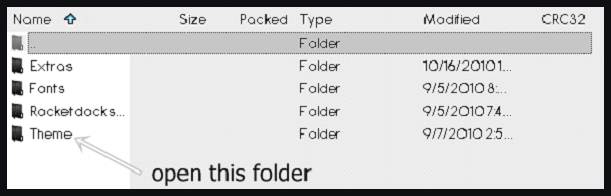
>> extract folder and u will see 4 folders (extras , fonts , rcoketdock skin and theme)
>>open THEME folder u will see a theme file and a folder (named : predators.theme and predator )
>>copy both files and paste it o C DRIVE/WINDOWS/RESOURCES/THEMES
>>now go to personalize and select predators theme
>>done :)

(if u wanna change font den copy fonts folder and paste it to C DRIVE/WINDOWS/RESOURCES/THEMES/PREDATOR and select theme again )

VISTA TRANSFORMATION PACK


hey xp userz hrz a theme for u :)

http://fc08.deviantart.net/fs21/f/2007/241/5/e/Longhorn_XP_RMX_by_Badboy_10.rar

download this file from provided link and follow ma instructions :
>>paste the exracted files into c:windows/resources/themes

>>direc t double click on extracted ‘visual style file’/theme file

>>done

WINDOWS 7 START BUTTON ANIMATOR

ANYBODY WANNA MAKE UR INDOWS 7 START MENU ANIMATED LIKE THIS PIC ?

hrz n app for u :)

download link: http://tinyurl.com/startba
xtract file and jus open start menu animator run s admin and see magic B-)

(i tried this app in windows 7 , donno it will work in xp,vista or not :s bt u can try this )

WIDOWS XP LEOPARD X THEME B-)

download link : http://www.winxsoft.com/stp/download.html

instructions :
>>http://www.mediafire.com/?3lkabp6ewx75w8b 1st dwnload this file and patch ur windows xp
>>download this theme from ma provided link
>>unrar theme file
>>install and reboot ur pc
>>enjoy :D
(this theme will transform ur windows xp os to looks like mac leopard os x like picture )

CAUTION:THIS THEME IS ONLY FOR XP NOT FOR VISTA AND WINDOWS 7

ELYSIUM ll

[IF U INSTALL THIS THEME AT 1ST U HAV TO PATCH UR WINDOWS 7 THEMES, PLZ CHEK OUR PAGE INFO TO KNOW HOW TO PATCH http://extremewin.blogspot.com/2011/04/universal-theme-patcher-instructions.html]

hey guyz anotha full glass theme for u B-)

totally transparent

download link : http://www.mediafire.com/?24slm5mabm2gbn2

INSTRUCTIONS :
>>dwonload theme file from ma provided link
>>setup this theme by 7tsp software (don need to unrar theMe file)
[IF U DONNO HOW TO INSTALL BY 7TSP PLS CHEK OUR PAGE INFO]

FOR TRANSPARENT WINDOW:
after install theme file
>open 7tsp
>go to extras>misc>black glass enhanced>tick both options and select fourteen from blank box>press download
>done :)

67 VISTA THEMES

HELLO WINDOWS VISTA USERZ

hrz a big gift for u B-)

67 THEMES in one file ;)

download link : http://www.mediafire.com/?3vxavpkkd3321m1

[ I DON USE WINDOWS VISTA SO CANT GIVE U PERFECT INSTRUCTIONS BUT I CAN GIVE U SOME HINTS]

HINTS:
>>download theme file from ma provided link and unrar
>>1st install vistaglass to enable glass transperancy and to patch ur windows vista theme
>>if u find any .exe file in this theme just install that and u will gt ur desired theme
>>if u don find any .exe file open theme folder and copy WINDOWS THEME FILE + SAME NAMES THEMES FOLDER (wich folder contains fonts,en-us.shell,wallpaper and some other files wid these items)
>>paste it to C DRIVE>WINDOWS>RESOURCES>THEMES and select themes from theme menu :)
>>done

NEED FOR SPEED THEME

DOWNLOAD LINK : http://www.mediafire.com/?06s1uu9hu8wd3z0

NOW FOLLOW MA INSTRUCTIONS :

>>download the theme file and xtract to desktop
>>after xtracting u will see a folder name THEME , open it
>> open folder den u will 2 filer 1 theme file and anotha folder
>>copy both files and paste it to C DRIVE>WINDOWS>RESOURCES>THEME folder
>>now go to personalize (by clicking mouses right button on desktop)
>>u will see need for speed theme in personalize
>> clik on theme to set and enjoy
(double clik on FULL GLASS if u want glass theme)

WINDOWS XP - SEVEN TRANSFORMATION PACK

this theme will transform ur windows xp to windows 7 like this picture :)

INSTRUCTION :
>>http://www.mediafire.com/?3lkabp6ewx75w8b 1st dwnload this file and patch ur windows xp
>>reboot ur pc
>>http://www.winxsoft.com/7tp/download.html
>>unrar file > open theme folder > install > reboot pc >done :)

HOW TO SET THEME

HOW TO SET THEMES (at first patch ur windows 7 themes by UNIVERSAL THEME PATCHER to use these themes ,windows 7 patch instruction download link : http://extremewin.blogspot.com/2011/04/universal-theme-patcher-instructions.html )


this is just an example.all theme files folder name and number of files wont be but same instructions for all theme.just try to use ur brain ,hope u will understand personalization

1. 1st download a theme any link and extract theme file to any location.after extracting theme file if u see some files like this :

there is no .exe file to install theme.simply open theme folder


2. After opening theme folder u will see files like this:

a.windows theme file
b.windows theme folder


3. copy theme file + folder that meanz both files and paste these files to C DRIVE>WINDOWS>RESOURCES>THEMES like my snap :


4.now simply go to personalization menu and u will see ur theme :) click on theme to set

Enjoy EXTREME THEMES 


EXCEPTION:

>>if u find any .exe file in theme folder like my snap:

double click to install this type files

>>if u find any 7tsp named file in theme folder like my snap:

u hav install this type files by 7TSP software .PLEASE DONT EXTRACT THIS TYPE RAR FILES(if u dont know how to use 7tsp software ,download 7tsp instruction from this link : http://extremewin.blogspot.com/2011/04/7sp7-theme-source-patcher-instructions.html)